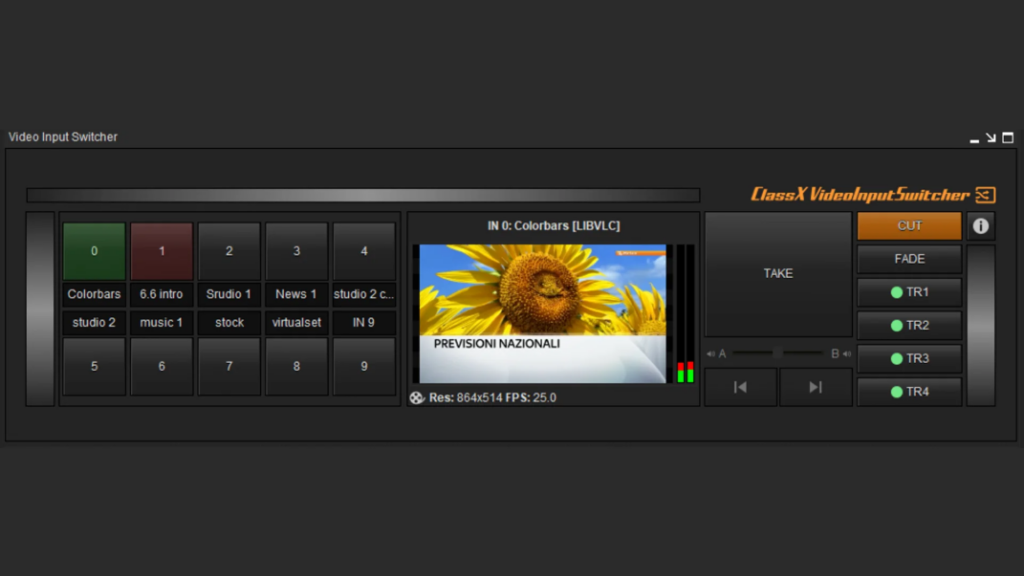
Take control of your video sources with fast, reliable and seamless switching. VideoInputSwitcher simplifies input selection and management, giving broadcast operators the flexibility and precision they need for live production workflows.
The game-changing LiveBoard plugin that transforms your CG graphics solution into a complete production tool.
10 Flexible Inputs
This new LiveBoard® Plugin will amaze all Picture-In-Picture users with this handy, always-active LiveBoard® Panel.
VideoInputSwitcher (VIS) is a special plugin, that can be used once in a LiveBoard® project and has the fantastic properties that all ClassX plugins have: it can be resized and positioned anywhere in the positioning area, and it can come in and out with an effect.
Supported Sources
SDI
NDI®
DirectShow
Spout
SharedFrame
LibVLC
SDI
NDI®
DirectShow
Spout
SharedFrame
LibVLC
SDI
NDI®
DirectShow
Spout
SharedFrame
LibVLC
SDI
NDI®
DirectShow
Spout
SharedFrame
LibVLC
Smart Scaling
Auto HQ Scaling
Automatically scale each video source to a common resolution in high quality, making it easy to mix SD, HD, 4K or custom-resolution inputs. This ensures consistent source sizing and helps VIS transitions remain smooth and seamless.
Simple Workflow
Simple Use of VIS
Create VIS with LiveBoard®’s familiar drag-and-drop workflow, put it on air like any other content, and use the dedicated Switcher workspace to monitor all configured video inputs through animated multiview previews. VIS integrates seamlessly into the Contents grid as another layer, so you can combine it with any number of graphics and define its visual priority as needed.
Custom Transitions
Special Feature
VIS goes beyond standard cut and fade transitions: create your own custom video transitions directly in CastaliaCG or CoralCG. A ready-to-use library is available from the Dashboard, and the LiveBoard® manual includes a quick guide to creating your own.
VIS Controller, switch from your tablet
As with other plugins and LiveBoard® features, ClassX offers its free SDK for creating your own commands, apps and drive LiveBoard® graphcis. Our developers have used AppInventor to create a fully functional remote controller of VIS, allowing to drive the switcher through a tablet.
Discover how VideoInputSwitcher (VIS) expands LiveBoard® with a powerful and flexible video switching workflow. Manage and preview multiple video sources in real time, combine them with graphics, and keep every operation inside the familiar LiveBoard® environment.
VIS supports different source types and resolutions, with high-quality scaling to keep inputs consistent and transitions smooth. You can switch sources using standard cut and fade modes or create your own custom transitions in CastaliaCG or CoralCG for a more distinctive visual result.
By bringing video switching, graphics and source control into a single workflow, VIS helps simplify live production while giving operators more creative freedom and faster access to every input.
Since ClassX is focused on graphics and wants to offer an innovation in terms of switching video inputs, VideoInputSwitcher can switch sources not only with the usual cut/fade modes but also with customizable transitions that you may freely create and edit in CastaliaCG or CoralCG. Make it your own way! There is a wide range of examples and that you can use right away and that you can download from your Dashboard account. You will find the quick VIS transition creation guide in the LiveBoard® manual. Easy as pie!
Enjoy the quick and easy operations to create the Live Switcher inside LiveBoard® in this little 90-seconds animation below